A gym workout log app built for fast set entry.
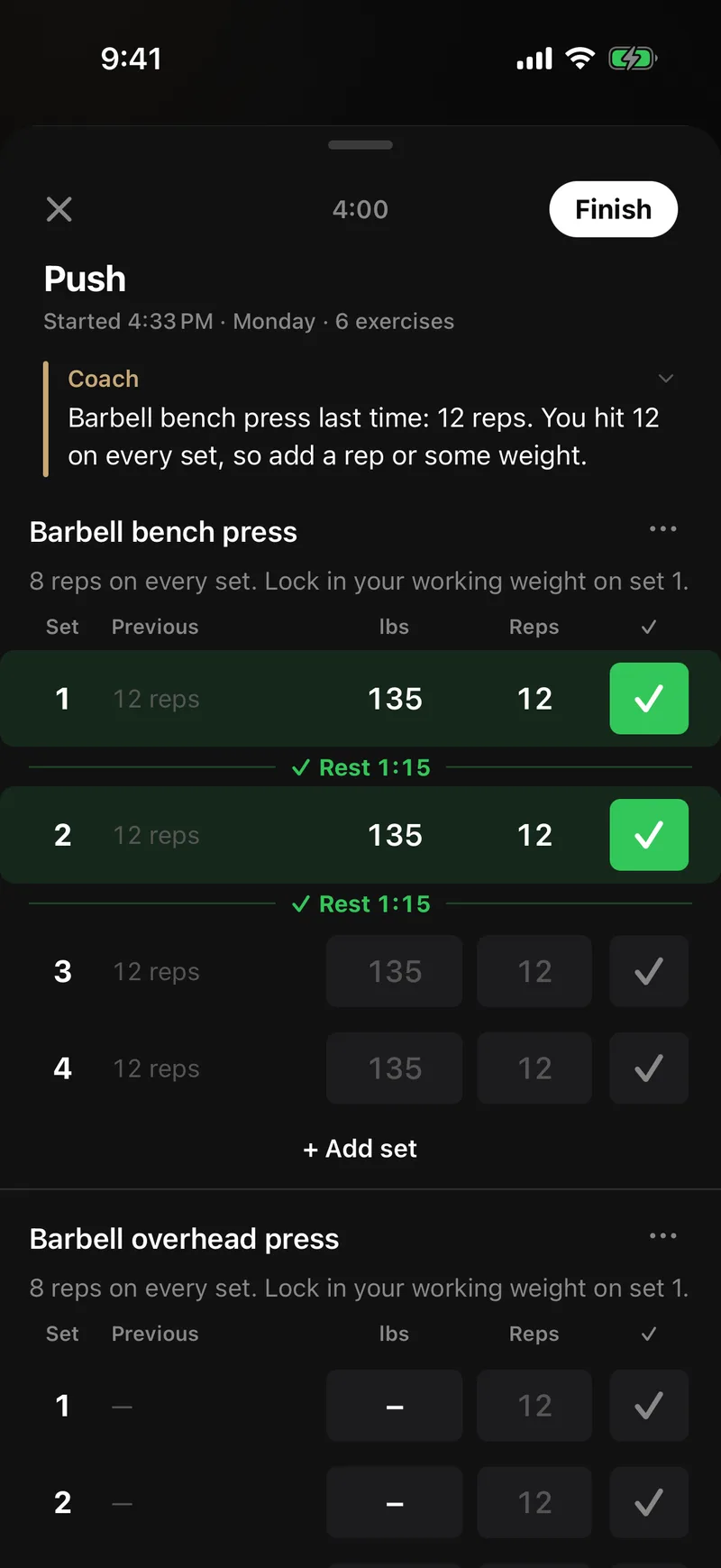
Enter weight and reps for each set, see what you lifted last time, and keep the session open without it blocking the app.
Sets, reps and weight in a tap or two
Each exercise lists its sets. Enter the weight and reps, mark the set done, and move on.
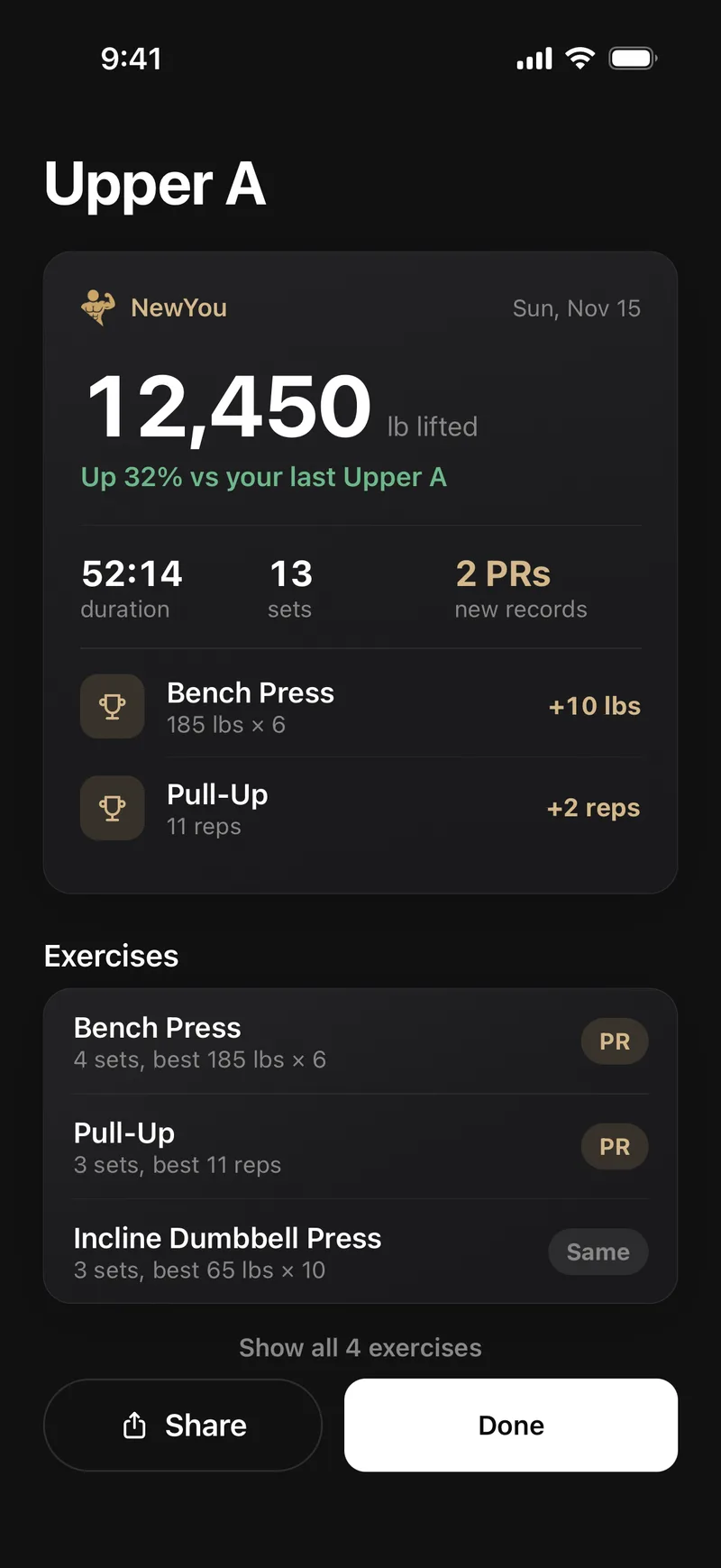
A finish screen with your summary
When you finish, you see a short summary of the session, and you can share it as a card.
How to log workouts at the gym
The best workout logging is the kind you actually do. That means it has to be quick, because nobody wants to fiddle with a phone between sets. Open your workout, find the exercise, and enter the weight and reps right after the set.
NewYou AI shows your previous numbers for the same exercise, so you do not need to remember them or scroll through old notes. You see what you did, then decide what to do today.
What to track for each set
Three numbers are enough for most lifters.
- Weight: the load on the bar or the machine.
- Reps: how many clean reps you completed.
- Set completion: mark it done as you go so the session stays accurate.
The workout sheet and mini bar
A workout is not always uninterrupted. You might want to log a snack, check a water goal or ask your coach something. The workout sheet minimizes to a mini bar, so you can move around the app and return to the same set without losing your place.
Tips for a clean workout log
Record the weight you used, not the weight you planned. If a set was short, log the reps you got. Honest numbers are what make progressive overload and personal records work later.
Start from a plan so you are not choosing exercises while tired. Your workout plan loads the session for you, and the exercise library is there when you want to swap something.
After the workout
Your session is saved to your history. Workouts logged in other apps or on an Apple Watch can also appear there when Apple Health is connected. New records show up on the lift's trend line.
Who a gym workout log is for
A workout log is for anyone who wants to get stronger or build muscle on purpose. Beginners benefit because a log shows steady gains that are easy to miss. Experienced lifters benefit because they can spot plateaus and decide when to change a program. It is also useful if you train with a mix of home and gym sessions.
How the log connects to the rest of your training
Every set you log feeds your personal records and trend lines, and it gives the app what it needs to suggest your next weight. Finished sessions also appear in your history next to workouts from Apple Health, and you can share a card of the session if you want to.
NewYou AI is a fitness and habit app, not medical advice. Talk to a clinician before big changes to your diet or training, especially with a health condition.
Frequently asked questions
What should I track in a workout log?
Weight, reps and sets for each exercise are the essentials. Tracking them every session lets you see whether you are doing more over time.
Does the workout keep running if I leave the sheet?
Yes. Minimizing the sheet turns it into a mini bar, and the session stays open until you finish it.
Can I see what I lifted last time?
Yes. Your previous numbers for each exercise are shown while you log, so you know what to beat.
Is there a rest timer?
Yes. It starts between sets and can also count down on your lock screen.
Related features
Rest timer between sets
A rest timer that runs between sets and counts down on your lock screen.
Learn morePersonal records (PR) tracker
A trend line and your records for every lift, so you can see whether you are getting stronger.
Learn moreProgressive overload suggestions
Next-weight suggestions based on what you did last time. Turn it off in Settings if you prefer.
Learn moreExercise library and picker
Find any exercise by body part and category, sort it your way, and add your own.
Learn morePersonalized workout plans
A weekly schedule built around your goal, plus routines and templates you can reuse.
Learn moreMeet Future You.
Free to download on iPhone. Android is coming soon.