A progress photo app that tracks the whole picture
NewYou AI lets you add a progress photo when you log a weigh-in, keeps your photos in a private gallery you can compare over time, and turns daily weigh-ins into a trend line so normal swings don't fool you.
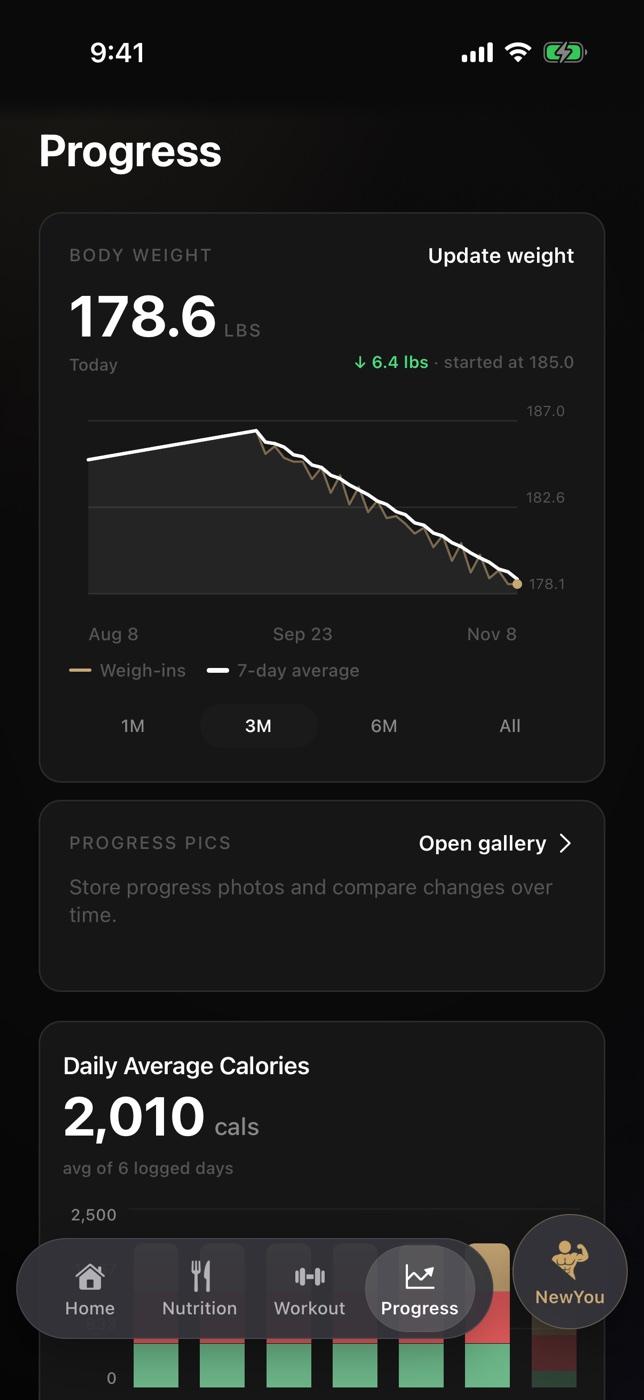
How progress photos work in NewYou
- Photo with your weigh-in. When you log your weight, you can add a progress photo in the same step. The weigh-in screen reminds you to use the same stance and lighting.
- A private gallery. Your photos collect in a progress gallery where you can look back and compare them over time.
- Numbers next to the pictures. Daily weigh-ins roll into a trend line, with weekly check-ins and calorie averages, so you can see whether the photos and the scale agree.
How to take progress photos you can compare
Plastic surgeons publish guidelines for keeping before-and-after photos consistent outside a studio. The idea works at home: change only your body and keep everything else the same.
- Same place and light. One spot with a plain wall, the same window or lamp, no flash.
- Same time. Morning, after the bathroom, before food or drink.
- Same distance. Phone on a shelf or tripod at about waist height, a tape mark where you stand, and the timer instead of a mirror selfie.
- Same poses and clothes. Front, side and back, relaxed, in the same shorts or swimsuit.
- Same camera. The normal 1x lens, no portrait mode, no filters.
Why one photo or one weigh-in can mislead you
Your body really does look different day to day, mostly because of water. In a European study of 1,421 adults who weighed in daily, weight ran about 0.35% higher after weekends and came back down during the week. That is why NewYou shows a trend instead of a single number, and why photos taken every 2 to 4 weeks tell you more than daily ones.
Want to see where your progress could lead? Future You shows an AI illustration of you at your goal. Keep it separate from your real progress photos.
Sources
- Persichetti, P., Simone, P., Langella, M., Marangi, G. F., & Carusi, C. (2007). Digital photography in plastic surgery: How to achieve reasonable standardization outside a photographic studio. Aesthetic Plastic Surgery, 31(2), 194–200. doi.org/10.1007/s00266-006-0125-5
- Turicchi, J., et al. (2020). Weekly, seasonal and holiday body weight fluctuation patterns among individuals engaged in a European multi-centre behavioural weight loss maintenance intervention. PLOS ONE, 15(4), e0232152. doi.org/10.1371/journal.pone.0232152
- Centers for Disease Control and Prevention. Losing weight. Healthy Weight and Growth. www.cdc.gov/healthy-weight-growth/losing-weight/index.html
Frequently asked questions
Are my progress photos private?
Yes. Your photos sit in private storage tied to your account and are never sold or posted to a feed. You can delete them in the app, and deleting your account removes them.
How often should I take progress photos?
Every 2 to 4 weeks works for most people. At a healthy pace of 1 to 2 pounds a week, change from one week to the next is too small to see reliably.
Do I have to add a photo with every weigh-in?
No. The progress photo is optional. Weigh in daily if you like, and add a photo on the days you want one.
Should I compare progress photos with my Future You preview?
No. Compare progress photos with earlier progress photos taken the same way. Future You is an AI illustration for motivation, not a target you should measure yourself against on a date.
Keep reading
- What would I look like if I lost weight?When change starts to show, and how long it takes.
- AI personal trainerThe workouts and food plan that drive the progress.
- How we handle your photosWhere photos are stored and how to delete them.
- Weight loss app for menLose fat and keep muscle, with a preview of the goal.
See your Future You.
Upload one selfie, pick your goal and pace, and see a blurred preview before you subscribe. Free to download on iPhone. Android is coming soon.